Web solution: a build handed to you, not licensed to you.
CloudService designs and builds marketing sites, web applications, and the integrations between them — including with its own API — from a scope call through launch and handover, with source and access handed over in full at the end.
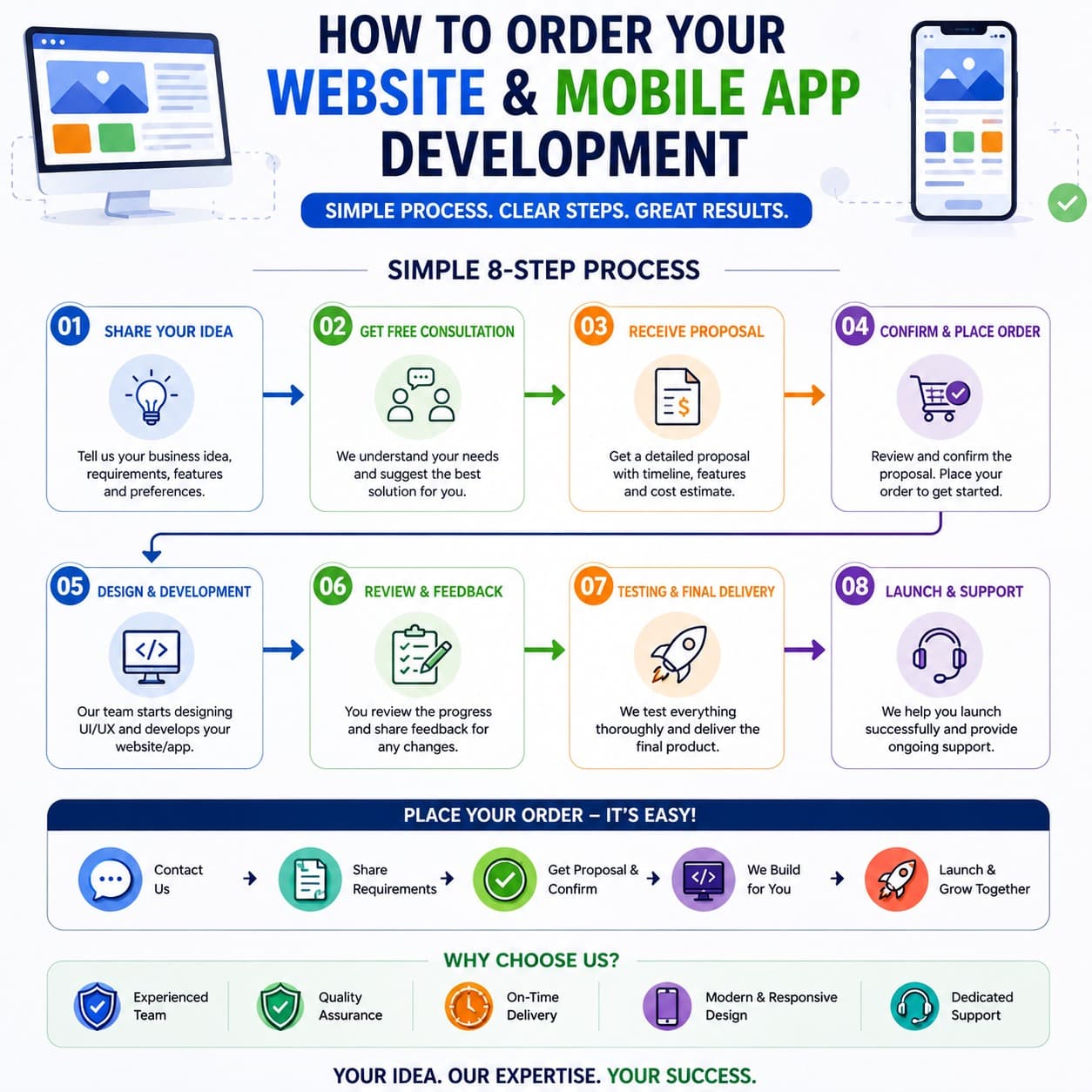
Simple process, clear steps.
Process · sequential
- 01
Share your idea
Tell us the business idea, requirements, features, and any preferences you already have in mind.
- 02
Free consultation
We talk through what you need and suggest the solution that fits, at no cost and with no commitment.
- 03
Receive proposal
A written proposal follows, covering timeline, features, and a cost estimate specific to your project.
- 04
Confirm and place order
Review the proposal, confirm the scope, and the engagement begins.
- 05
Design and development
UI/UX design comes first, then the build itself.
- 06
Review and feedback
You review progress as it happens and request changes before anything is treated as final.
- 07
Testing and final delivery
The build goes through thorough testing, then handover.
- 08
Launch and support
We help with launch, and support continues after.
Shorter version of the same path: contact us, share your requirements, receive a proposal and confirm, we build it, then launch and grow.
Why choose us.
- Experienced team — delivery led by people who have shipped this kind of work before, not a first attempt.
- Quality assurance — testing and review happen before handover, not after a launch date has already passed.
- On-time delivery — the proposal's timeline is the one we build against.
- Modern, responsive design — every build is designed to work across devices and screen sizes from the start.
- Dedicated support — support continues after launch, through the same contact you used to start the project.
Kinds of work this covers.
General categories of work. The concrete stack, hosting, and tooling for a given project are decided per engagement during scoping, not listed here.
Architecture · static
| Kind of work | What it typically involves |
|---|---|
| Marketing & content sites | Brochure sites, landing pages, and other content-led surfaces meant to represent the business publicly. |
| Web applications | Dashboards, internal tools, and customer-facing products built as full applications rather than static pages. |
| Integrations | Connecting a site or app to the CloudService API, a CMS, a payment processor, or another third-party service. |
| Migrations & rebuilds | Moving an existing site or app to a new stack, framework, or host without losing what already works. |
We capture interest, you get quality leads.
Sites and apps we build can also be wired to attract visitors and route the ones worth following up straight to you, as part of the same engagement rather than a separate tool.
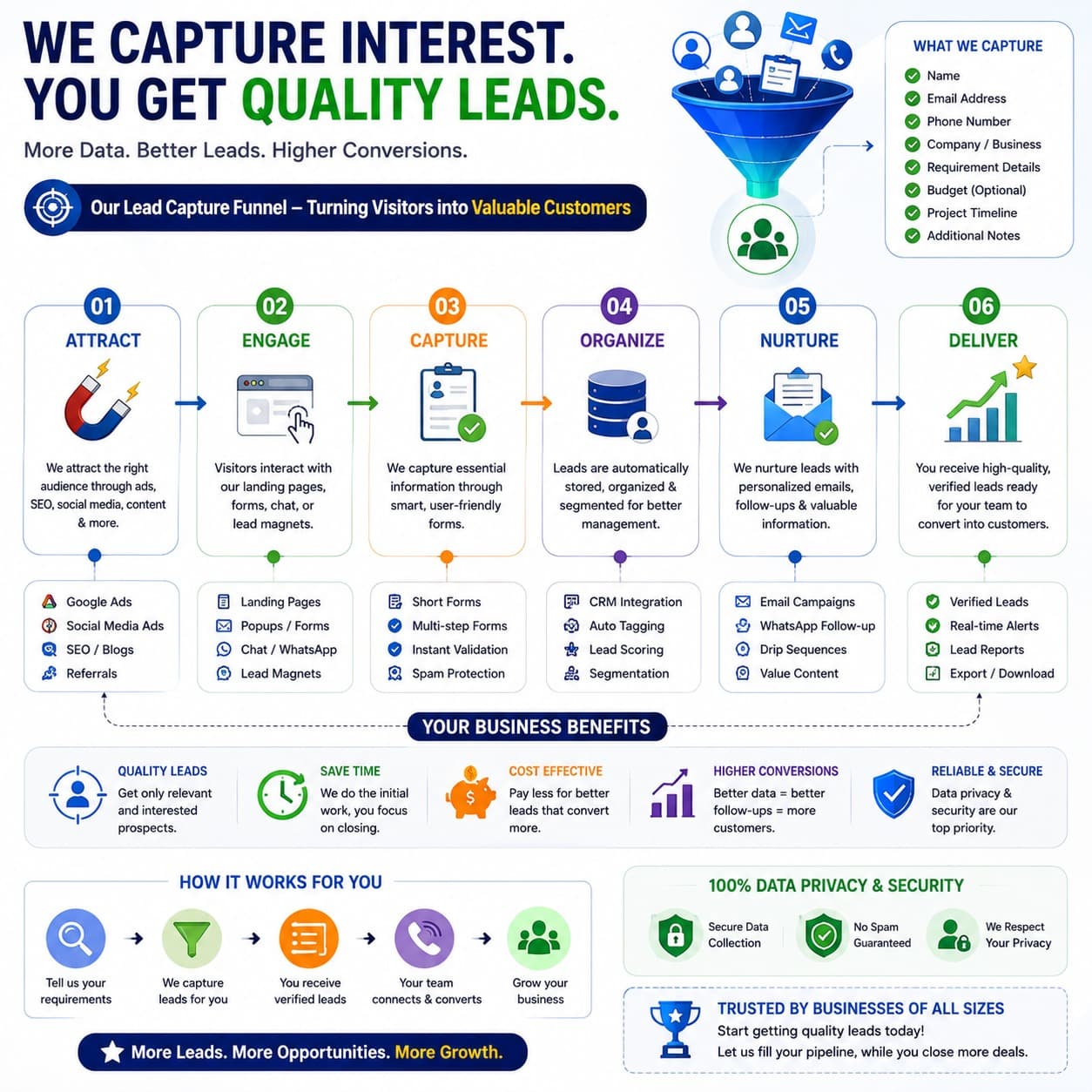
Funnel · narrowing
- 01
Attract
Traffic reaches the site or app through ads, SEO, social, content, and referrals.
- 02
Engage
Landing pages, popups and forms, chat and WhatsApp, and lead magnets turn a visit into interest.
- 03
Capture
Short and multi-step forms collect the details, with instant validation and spam protection built in.
- 04
Organize
Leads land in your CRM, auto-tagged, scored, and segmented as they come in.
- 05
Nurture
Email campaigns, WhatsApp follow-up, drip sequences, and further value content keep the conversation going.
- 06
Deliver
Verified leads reach you with real-time alerts, plus reports you can export and download.
What gets captured.
Forms are built to collect name, email, phone, company, requirement details, an optional budget, project timeline, and any additional notes — whichever fields the funnel needs.
Why it’s worth adding.
- Quality leads — the funnel filters for people worth following up, not just a higher count of form submissions.
- Saves time — automated capture and organizing means less manual chasing of every enquiry.
- Cost effective — runs as part of the same engagement rather than a separate tool subscription to manage.
- Higher conversions — better organized, faster-followed-up leads convert at a higher rate than an inbox of unsorted enquiries.
- Reliable and secure — collection is spam-filtered and built to respect the privacy of anyone who submits a form.
What arrives at handover.
Assembly · static
- Source and repository access
- The client owns the code; nothing is held back to keep a subscription running.
- A deployed build
- Live at the agreed domain and hosting, not left on staging.
- Build documentation
- What was built and how it's configured, in writing.
- A handover walkthrough
- A session covering the build before the engagement closes.
What this page does not say.
- We describe the kind of work — marketing sites, web applications, integrations, and migrations — in general terms. The specific stack, hosting, and tooling are decided per project during scoping, not listed here.
- We do not publish a portfolio or a completeness guarantee for sites and apps we build. What ships is scoped to your requirements, not a generic template.
- Pricing and timelines are scoped per project rather than published here — share your requirements through the contact options below and we will return a proposal.
- We do not publish team size or client names and case studies on this page.
Tell us what you’re building.
Every engagement starts with a scoping conversation about the site or app, the stack, and what launch looks like. Reach out through support to start one.
Talk to us before you commit.
Reach CloudService directly, or raise a ticket if you’d rather keep a written record.